Introducton
This computer package (f-Spectra) is developed with a user-friendly graphical interface to do fitting and prediction of free-ion parameters, crystal field parameters, correlation crystal field parameters and superposition model parameters to the energy levels of f-shell ions as well as calculations of transition intensities, energy levels (with identification of irreducible representations) and statevectors etc. By using this software, you must have agreed with the following conditions of usage (otherwise you should not use it):
- Copyright for the computer program, source code and related data files rest with the author - Prof. YEUNG Yau Yuen (the software developer) and all users have nothing to do with it.
- As this package is provided free-of-charge, the software developer will not bear any warranty and liability on its usage.
- For whatever purpose, the user shall not copy or redistribute the package to other persons, nor make it available in the public domain.
- The user will not allow other person(s) to use this package without the software developer’s prior consent.
- The user will report to the software developer any errors or problems found on using this package.
This f-Spectra computer package was developed by Professor YEUNG Yau Yuen for spectroscopic analysis of f-shell ions in vapour state or doped at arbitrary symmetry sites in host crystals. It has been tested to work in the Windows XP/Vista/7/8/10 systems as well as the Linux platform via the WINE program. Please send feedback or comments to yeungy@acm.org or dr.yeung@physics.org.
Installation
Run the installation package (f-Spectra_install.exe) and it will unzip itself for automatic installation. You should keep the system files if they are newer than the ones to be installed.
After installation, you should go to the f-Spectra folder (usually located at C:\Program Files (x86)\f-Spectra\) and unzip the files rme.zip and cfp.zip into the f-Spectra folder so that their embedded files will be inserted into the folders rme and cfp, respectively.
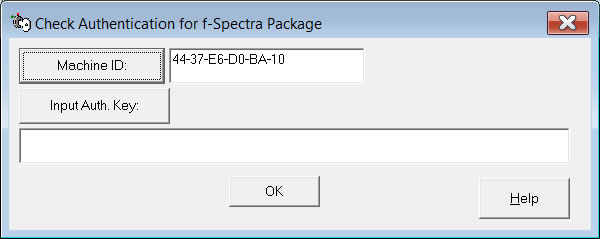
For the first time of running this package, the window below is displayed to ask you to provide the Auth Key:
You should copy the Machine ID and send email to yeungy@acm.org or dr.yeung@physics.org for getting the Auth Key.
To open or save files in Excel format, your computer system need to have either MS Excel or equivalent spreadsheet programme from OpenOffice.org or Kingsoft Office. Otherwise, only plain texts files will be used to input or output data or parameters.
[Previous: Table of Contents]|[Table of Contents]|[Next: Quick Start]
Copyright (C) 2016. YEUNG Yau Yuen. All Rights Reserved.